
What the Services page shows
Services lists the services your SpamDuster server runs, whether each is running, since when, and how much memory and CPU it uses. The tiles at the top show the server's load, memory in use, free mail storage, and how long it has been running.
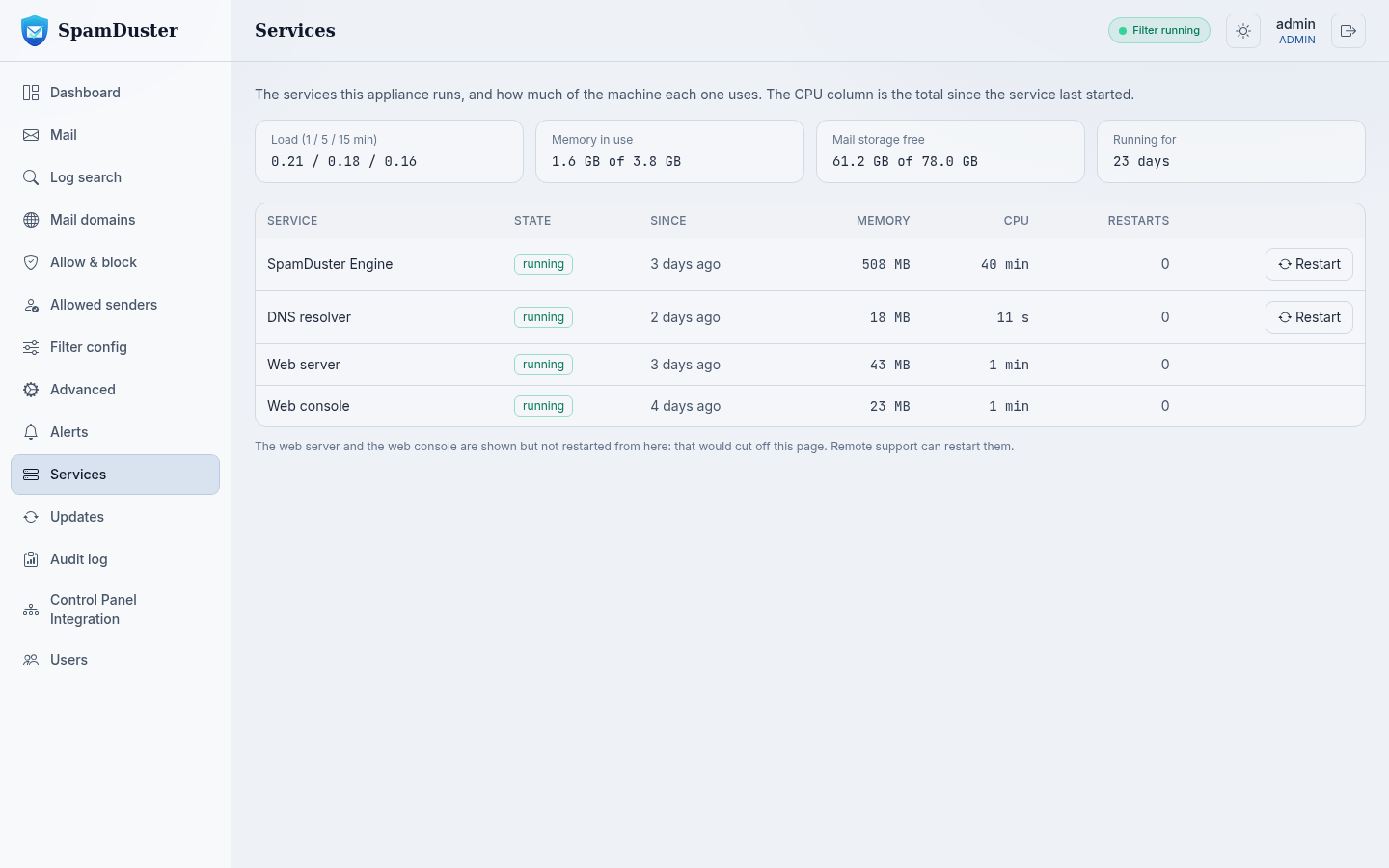
Restart a service
- In the console, open Services.
- Select Restart next to the service and confirm.
| Service | During the restart |
|---|---|
| SpamDuster Engine | Mail is refused with a temporary error for about half a minute. Senders retry, so nothing is lost. |
| DNS resolver | Lookups pause for a few seconds. |
| Virus scanner (on servers that scan for viruses locally) | It takes a minute or two to load its signatures again. |
The web server and the console itself are shown but cannot be restarted from the console.
Schedule a regular restart
A short periodic restart frees memory. In Advanced, under Scheduled restart, choose Weekly or Daily, pick a quiet time, and select Save. Choose Disabled to turn it off.
The header says Filter stopped
The badge at the top of every console page shows Filter running or Filter stopped. If it shows Filter stopped for more than a few minutes, restart SpamDuster Engine on Services. If that does not help, open a ticket: see Open a support ticket.
Updated 2026-10-26Need help? Open a ticket in the billing portal.