Release one message
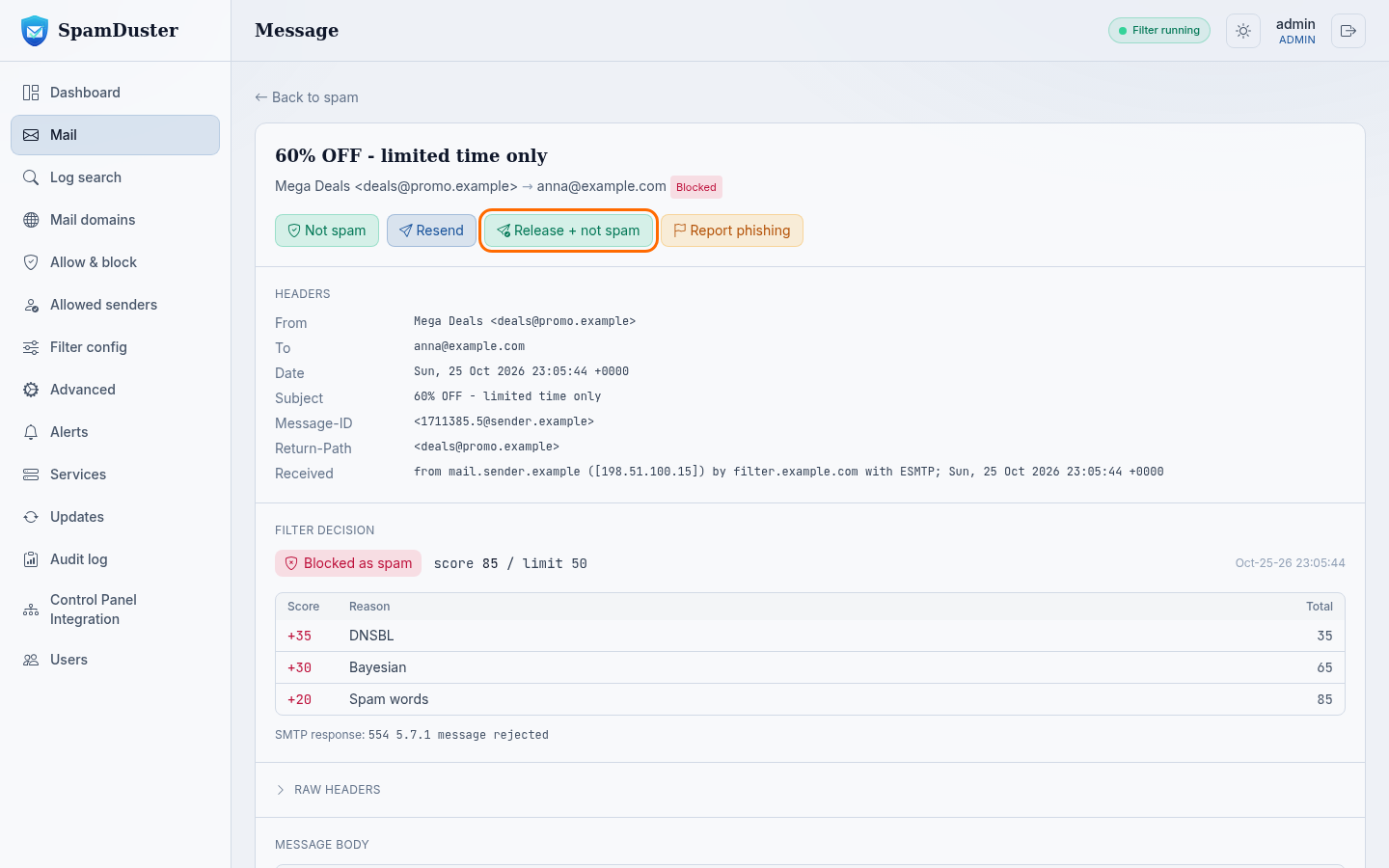
- In the console, open the Mail page and find the message. See Review blocked mail.
- Select the message to open it.
- Select one of these:
- Release + not spam delivers the message and teaches the filter that mail like it is wanted. Use this for a wanted message the filter blocked as spam.
- Resend only delivers the message.
- Confirm. The message is delivered to its original recipients within a minute.
Release several messages at once
- On the Mail page of the console, tick the box next to each message, or tick the box in the header row to select the whole page.
- To select every message that matches your search, not just this page, select Select all … matching.
- Select Resend or Release + not spam in the bar above the list, and confirm.
Releasing phishing and virus mail
Release mail from Phishing or Viruses only when you are sure it is safe. These folders hold mail SpamDuster found to be phishing or to carry malware. If phishing detection was wrong, select Not phishing on the message first; that records the mistake without delivering anything.
If a released message arrives cut off or not at all
SpamDuster can only release what it stored. If the Store complete mail setting in Advanced keeps only the start of each message, a large message cannot be released whole. See A released message arrives incomplete.
Stop the same sender being blocked again
Releasing a message does not change how the next one from that sender is treated. To always let a trusted sender through, see Allow a sender.
Updated 2026-10-29Need help? Open a ticket in the billing portal.